

Text message consent
Last updated: 22 October 2026
BreakPass is an alert service operated by X Labs L.L.C-FZ, licence 2650741.01, Meydan Grandstand, 6th floor, Nad Al Sheba, Dubai, United Arab Emirates. It sends transactional text messages only: alerts that a customer's own software or AI agent triggers, and messages about the BreakPass account. No marketing, no promotions, no purchased or shared lists.
How a person opts in
- A phone number is added in the BreakPass web app: the account owner adds their own number, or invites someone (for example a family member or colleague) by sending them a personal link. The invite page names the person who sent it.
- Before any message is sent, the person sees the consent text below. The account owner sees it directly above the "Send code" button; there is no checkbox, and pressing "Send code" is the agreement (at sign-up the owner has also ticked an unticked box: "I accept the Terms of Service and have read the Privacy Policy." and a required box: "My country of residence is not the United Arab Emirates."). An invited person sees it as the label of a checkbox that is not ticked by default. Nothing is sent to them until they tick it.
- The person receives a one-time code by SMS (by WhatsApp where that is offered) and enters it in the app to confirm the number is theirs.
- Only confirmed numbers can receive alerts.
What the opt-in screens look like
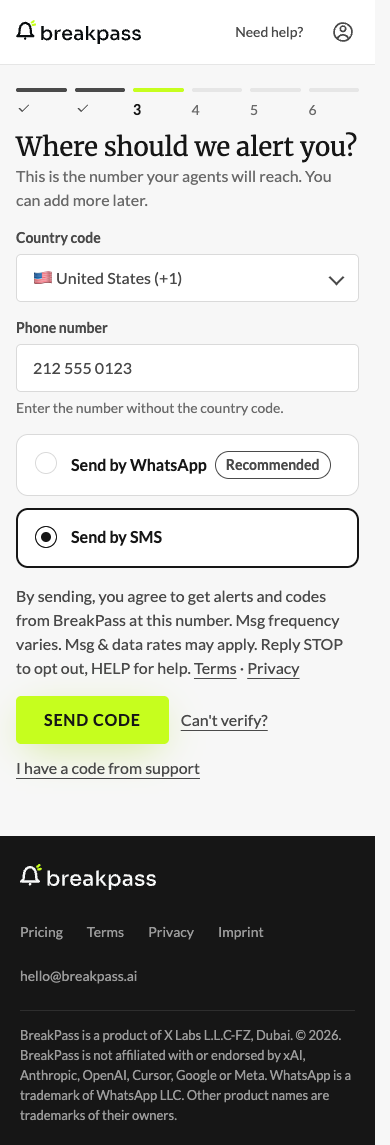
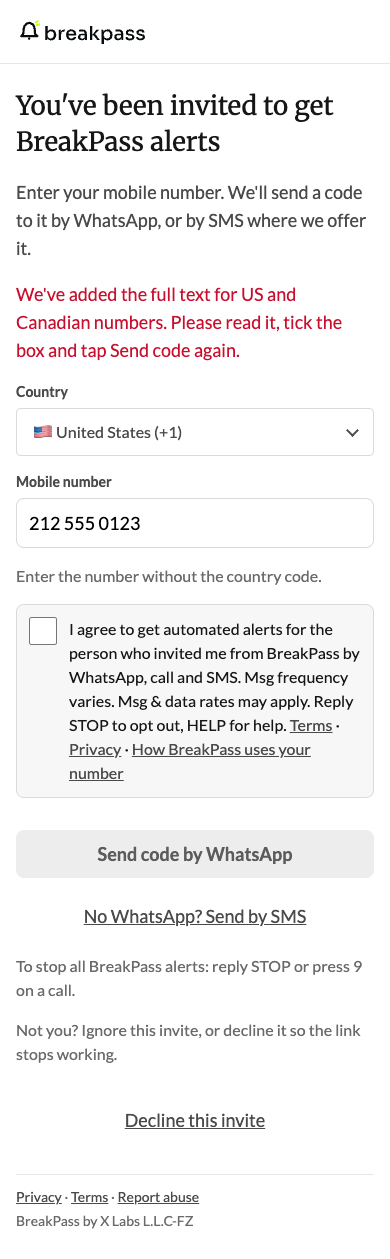
Screenshots of the BreakPass web app (the owner's screen on 20 October 2026, the invite page on 21 October 2026), with a sample US number (212 555 0123). First: the account owner adds their own number; the consent text (for +1 numbers, US and Canada, the full text) sits directly above the "Send code" button, followed by links to Terms and Privacy, and there is no checkbox. Second: the page an invited person opens from their personal link; the consent box is not ticked by default, no code is sent until they tick it, and the whole consent text is the label of the box, with the links "Terms · Privacy · How BreakPass uses your number" at its end. The link "How BreakPass uses your number" opens the section of our Privacy Policy for people whose number was added by someone else.
The invite page first shows the shorter text. When a +1 number is entered, the page comes back with the full +1 text as the label, a note "We've added the full text for US and Canadian numbers. Please read it, tick the box and tap Send code again." and the box unticked, and no code is sent until the person ticks it again. The second screenshot shows that page.
Consent text shown before the first message
Own number (no checkbox), +1 numbers: "By sending, you agree to get alerts and codes from BreakPass at this number. Msg frequency varies. Msg & data rates may apply. Reply STOP to opt out, HELP for help." The text is followed by links to Terms and Privacy. Pressing "Send code" is the agreement; there is no checkbox. Numbers in other countries see the first sentence only: "By sending, you agree to get alerts and codes from BreakPass at this number."
Invited number (checkbox), +1 numbers: "I agree to get automated alerts for {Owner} from BreakPass by WhatsApp, call and SMS. Msg frequency varies. Msg & data rates may apply. Reply STOP to opt out, HELP for help." {Owner} is the name the account owner saved for the invite, or "the person who invited me" when there is none (as in the screenshot). This whole text is the label of the checkbox, which is not ticked by default. It does not ask the person to agree to the Terms of Service or the Privacy Policy; the links "Terms · Privacy · How BreakPass uses your number" end the label. Numbers in other countries see the label's first sentence only: "I agree to get automated alerts for {Owner} from BreakPass by WhatsApp, call and SMS." Every invited person also sees, below the button, how to stop: "To stop all BreakPass alerts: reply STOP or press 9 on a call." for +1 numbers, and "To stop all BreakPass alerts: reply STOP on WhatsApp or press 9 on a call." elsewhere (texts to other countries may come from a sender that can’t take replies).
Stop and help
- Reply STOP (or STOPALL, UNSUBSCRIBE, CANCEL, END, QUIT) to a BreakPass WhatsApp message, or to a BreakPass text if you have a US or Canadian number, to stop all BreakPass alerts to that number, by SMS, WhatsApp and call. Reply: "BreakPass: You're unsubscribed. This number won't get any more BreakPass alerts by SMS, WhatsApp or call. Help: hello@breakpass.ai"
- Reply HELP (or INFO) for help: "BreakPass alerts. Help: hello@breakpass.ai. Reply STOP to opt out."
- Reply START (or YES, UNSTOP) after stopping: "BreakPass: to get alerts again, ask the person who added your number for a new invite." A stopped number gets alerts again only after a new invite and a new confirmation code.
- On a call, press 9 to stop all BreakPass alerts to that number.
- Or email hello@breakpass.ai to stop all BreakPass alerts to your number.
- Message frequency varies with the alerts a customer's own software sends. Standard message and data rates may apply.
Example messages
Only SMS to US and Canadian (+1) numbers end with the footer "This is an automated BreakPass alert. Reply STOP to opt out." SMS to other countries have no footer. The examples below are SMS to +1 numbers. SMS alerts to +1 numbers start once our toll-free number is approved; until then codes may come by SMS and alerts by WhatsApp or call.
- "Server CPU at 92 percent for 10 minutes.
This is an automated BreakPass alert. Reply STOP to opt out." - "Back door open for 15 minutes.
This is an automated BreakPass alert. Reply STOP to opt out."
Privacy
We never sell your phone number. No mobile information is shared with third parties or affiliates for marketing or promotional purposes. Opt-in data and consent are never shared with any third party. Details: Privacy Policy (section "Text messages and calls: your consent") and Terms.
Contact: hello@breakpass.ai · +1 646 921 0835